For freelancers

Project management for freelancers, without the agency software

Milestones gives each client a project, each phase of the job a milestone and each deliverable a task, so you always know what you owe whom this week. It runs on iPhone, iPad and Mac and syncs through your own iCloud.

Download on the App Store Free for two projects · Works on iPhone, iPad, and Mac.

Updated October 26, 2026 by Yassine Zeriouh, the developer of Milestones

Project management for a freelancer comes down to three questions each morning: what does each client get next, by when, and what’s waiting on them? Milestones answers them with one structure: a project per client or job, milestones for its phases (often the same ones the contract pays on), and tasks for the work inside each phase. Today and Upcoming pull everything that’s due from every client into one list.

It’s a planner for your side of the work. It doesn’t track time, send invoices or give clients a login, so most freelancers keep the invoicing app they already use next to it. It’s free for two projects, and past clients you archive don’t count toward that.


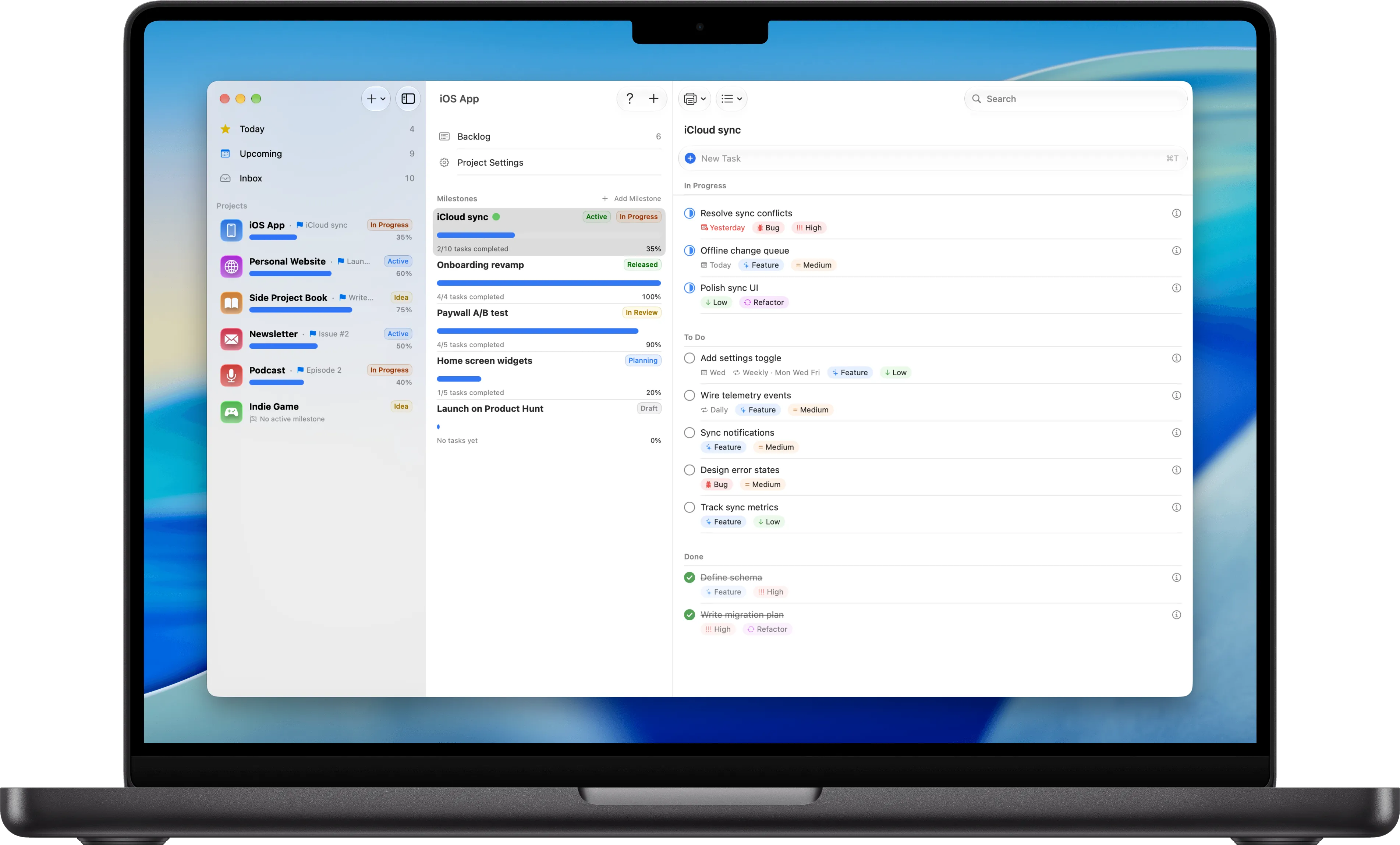
Milestones on a MacBook: the sidebar lists each project with its active milestone and a progress bar, the middle column shows the open project’s milestones with their statuses, and the right column shows the active milestone’s tasks grouped into In Progress, To Do and Done.

The problem

Why freelancers outgrow their first system

What tends to break once you have more than a couple of clients at the same time.

Team software priced for an agency

Asana, ClickUp and monday.com are built for teams: seats, permissions, workload charts and onboarding calls. As one person with six clients, you pay for collaboration you never use and spend your first week turning a team tool into a personal one.

One to-do list where every client blurs together

A single list in Things, Todoist or Reminders works until the fourth client. Then the logo revisions, the homepage copy and the invoice reminder sit side by side, and nothing tells you which job is in its second revision round and which is waiting on feedback.

Phases and payments that live in your head

Most client work runs in stages, and many contracts pay on them: a deposit at kickoff, a payment when concepts are approved, the rest at handoff. When those stages exist only in an email thread, an invoice goes out late or a deliverable slips because nobody wrote the date down.

A notes app that turned into a system

Plenty of freelancers end up with a Notion page or a note per client. It holds everything, but it can’t tell you what’s due this week across all of them, and keeping those pages tidy becomes a second job that nobody pays you for.

Features

How Milestones handles client work

The parts of the app freelancers use most, and which of them need Pro.

A project per client

Each client or job is its own project with its own icon and color, so six clients are six rows in the sidebar, each with a progress bar. When a job ends, archive it: the project keeps its milestones and tasks, can come back any time, and no longer counts toward the free plan.

Milestones for the phases you get paid on

Split a job into the stages you agreed on: discovery, first draft, revisions, handoff. Each milestone gets a start date, a due date, a status and a progress bar filled by its tasks, so “concepts due Friday” is a date on screen instead of a line in an email.

The current phase of every client at a glance

Mark the phase you’re in as active and the sidebar shows it under the client’s name. One look tells you that one client is in revisions, another is waiting on content and a third is ready to invoice. With Pro, a project can have several active milestones, or none.

Today and Upcoming across every client

Tasks with a date land in Today and Upcoming whichever client they belong to, and milestones due that day show up there too. That’s one list each morning instead of six projects to open, and the Inbox holds whatever you jot down before you know which client it’s for.

Statuses for work that waits on clients

Milestones start out as Draft, Planning, In Progress, In Review or Released, and In Review is a natural home for work that’s waiting on client feedback. With Pro you can rename those statuses or add your own, such as Waiting on client or Invoiced, for milestones and for projects.

Dates, tags and priorities in one line

Type a task the way you’d say it: “Send invoice friday #acme !2” sets the due date, the tag and the priority as you type. Search for a tag and open its list to see that work from every client together. Repeating tasks, like a monthly report for a retainer, are part of Pro.

A status update without a client login

When a client asks where things stand, print a milestone’s task list or export it as a PDF and send it along. They see what’s done and what’s next without an account, and you keep planning in one place instead of maintaining a shared board for them.

Your client list stays on your devices

Projects sync through your own iCloud to iPhone, iPad and Mac, and the Apple Watch app shows them too, with no Milestones account and no third-party server holding your client list. It works offline at a client’s office or on a train and catches up when you’re back online.

Other options

Other tools freelancers use, and who they suit

Milestones only plans the work. If you need more in one place, or need to share it, one of these may fit better.

Moxie
A freelance business suite: projects, time tracking, invoices, contracts and a client portal
Bonsai
Proposals, contracts, time tracking, invoicing and bookkeeping for freelancers and small firms
Trello
Boards you share with a client or a subcontractor
Notion
Client wikis, docs and databases in one workspace
Todoist
One task list on every platform, Windows, Android and the web included
Things 3
A personal to-do list on Apple devices for planning the day

Not for everyone

Who Milestones isn’t for

  • Freelancers who want time tracking and invoicing in the same app: Milestones does neither, so a suite like Moxie or Bonsai fits better.
  • Anyone who shares boards with clients or subcontractors: projects can’t be shared, and there are no comments or assignees.
  • Anyone who works on Windows, Android or in a browser: Milestones runs only on Apple devices.

FAQ

Frequently asked questions

What is the best project management app for freelancers?

It depends on what you need next to the plan. If you want invoicing, contracts and time tracking in one place, a freelance suite like Moxie or Bonsai fits. If clients work in your board with you, Trello does. If you want a private planner on Apple devices that shows each client’s phases and what’s due across all of them, that’s what Milestones is built for.

Is Milestones free for freelancers?

Yes, for two projects at a time, with no time limit, and archived projects don’t count, so finished clients can stay in the app. Pro removes the limit and adds repeating tasks, Kanban boards, custom statuses and widgets for $5.99 a month, $29.99 a year or $79.99 once, on iPhone, iPad and Mac.

Does Milestones track time or send invoices?

No. It plans the work and leaves money to the tools built for it. Many freelancers add a task like “Send invoice” to the milestone a payment is tied to, with a due date, so it shows up in Today on the right day and the invoicing app takes it from there.

Can my clients see my projects?

No. There are no client logins, shared boards or comments, and projects sync only to your own devices through your iCloud. To update a client, print a milestone’s task list or export it as a PDF. If you want clients working in the same board, Trello or a suite with a client portal is the better fit.

How should a freelancer organize projects and milestones?

Give each client a project, or each job for a client you work with again and again. Add milestones for the stages in your contract, with the dates you agreed, and tasks for the work inside each stage. Retainer clients work well with one milestone per month. The client project tracking guide walks through it step by step.

Does Milestones work on Windows or Android?

No. It runs on iPhone, iPad, Mac and Apple Watch only, and syncs through iCloud. If part of your work happens on Windows, Android or in a browser, Todoist and Trello run everywhere, and a freelance suite like Moxie or Bonsai works in the browser.

Put every client on one screen

Free for two projects on iPhone, iPad and Mac. Add your busiest client and see what’s due this week.

Download on the App Store

Free for two projects