For personal projects

Personal project management for the things you want to finish

Milestones turns a renovation, a side project, a course or a book into milestones with their own tasks and progress, so it moves forward a little every week. It runs on iPhone, iPad, Mac and Apple Watch and keeps everything in your own iCloud.

Download on the App Store Free for two projects · Works on iPhone, iPad, and Mac.

Updated October 26, 2026 by Yassine Zeriouh, the developer of Milestones

Personal project management is project management for one person: taking something you want to finish outside of work, like a kitchen renovation, a side project, a course or a move, and breaking it into a few milestones with the next tasks inside each. It doesn’t need Gantt charts or a team tool. It needs one place that shows every project you’ve started, how far along each one is, and what to do next.

Milestones is built for exactly that: a project per goal, milestones for its stages, tasks for the work, and a Today list that pulls what’s due from all of them. It’s free for two projects at a time, and finished projects you archive don’t count toward that.


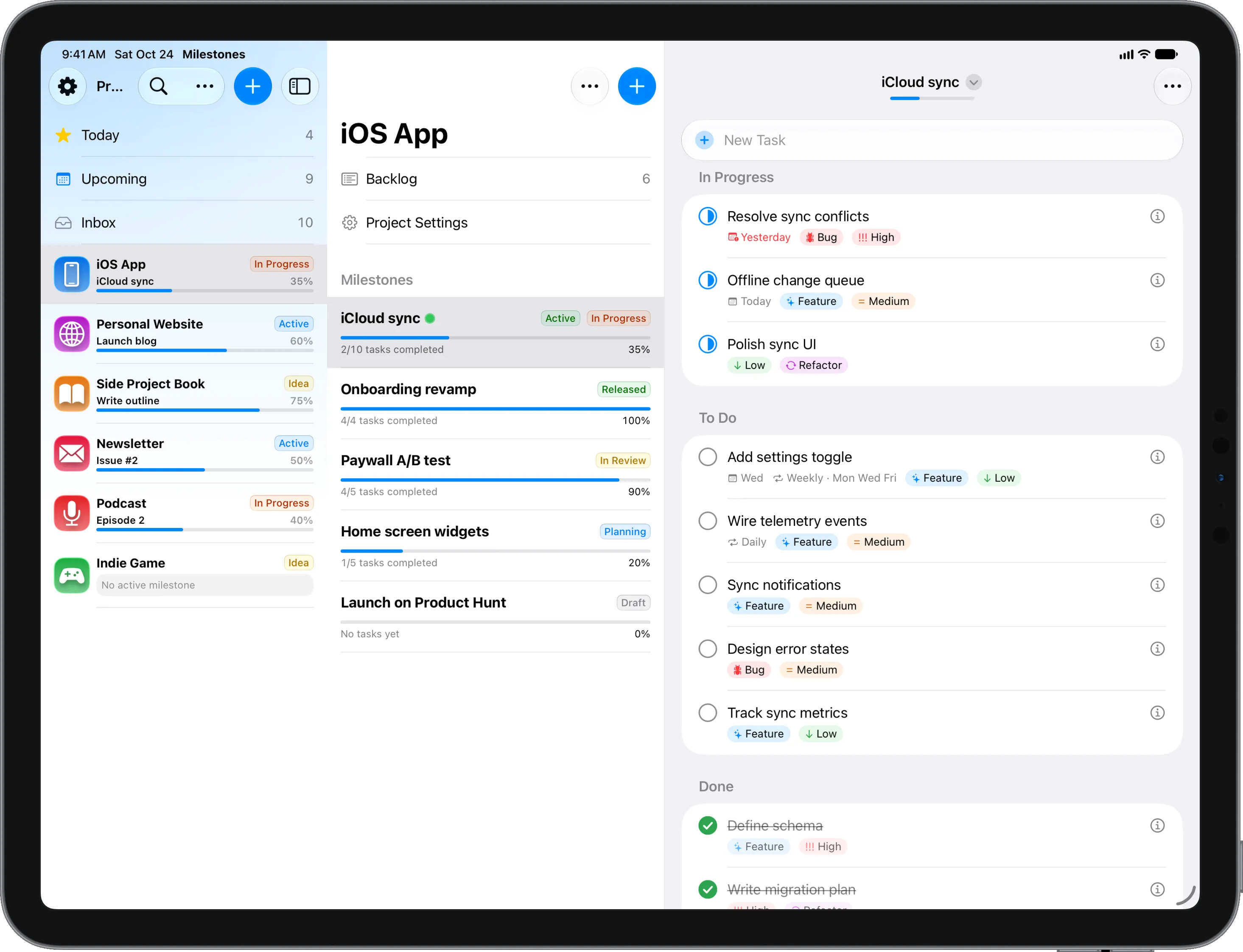
Milestones on iPad: a sidebar of personal projects such as a website, a book, a newsletter and a podcast, each with its progress, beside one project’s milestones and the tasks of its active milestone, grouped into In Progress, To Do and Done.

The problem

Why personal projects stall

It’s rarely a lack of time. Usually it’s one of these.

Projects that live only in your head

A side project, a garden plan and a half-finished course all compete for the same evenings. When none of them is written down as a project with a next step, you spend your free time deciding what to do instead of doing it, and the one you care about most quietly stalls.

A to-do list that can’t tell projects apart

Reminders or a single to-do app holds “buy tiles” next to “renew passport” next to “write chapter 3”. Everything is a task, nothing shows how far the renovation or the book has come, and a big project turns into a long list you stop opening.

Work tools that feel like work

Asana, ClickUp or Jira can plan anything, but using them at home means workspaces, boards and settings built for a team. Planning a weekend project shouldn’t feel like another shift, so the tool is usually abandoned after the first week.

No sense of progress

Personal projects run on motivation, and motivation runs on seeing progress. Without milestones, a six-month project feels like it’s stuck at zero until the day it’s done, which is usually why that day never comes. Finishing one stage is often what gets you to start the next.

Features

How Milestones keeps personal projects moving

What the app does for projects you run on your own time, and which parts need Pro.

One project per goal

Everything you want to finish gets its own project with an icon and a color: the renovation, the app, the half marathon, the photo book. The sidebar shows all of them at once, each with a progress bar, so you can see what’s moving and what has stalled.

Milestones that make a big project small

Split a project into stages you can actually finish: for a renovation, demolition, wiring, tiling and painting; for a book, outline, first draft and edit. Each milestone has its own tasks, dates and progress, and the active one shows under the project’s name in the sidebar.

Today shows the next step across projects

Tasks with a date land in Today and Upcoming, whichever project they belong to. Open the app in the evening and the one or two things worth doing are already there, instead of six projects to scan. The Inbox holds ideas until you know where they belong.

Simple lists for everything else

Not everything is a project. A packing list, a reading list or a shopping list can be a simple list without milestones, right next to your projects in the sidebar, with the same quick entry and the same sync across your devices.

Type it the way you’d say it

“Order tiles saturday #kitchen !2” sets the date, the tag and the priority as you type. Ask Siri to add a task while you’re out, or check one off on your Apple Watch, whose app is free. Shortcuts can use Milestones in automations of your own.

Keep home apart from work (Pro)

If you also plan work in Milestones, workspaces keep personal projects in a space of their own, and Today, Upcoming and search follow whichever one is open. Creating workspaces is part of Pro, along with repeating tasks, Kanban boards and widgets.

Finish, archive, start the next one

When a project is done, archive it. It keeps its milestones and tasks, can come back any time, and no longer counts toward the free plan’s two projects, which suits personal projects that come and go with the seasons and sometimes return years later.

Private by default

Your projects sync through your own iCloud between iPhone, iPad and Mac, with no Milestones account and no third-party server. It works offline, and nobody else sees your plans unless you print a task list or export it as a PDF yourself.

Other options

Other apps for personal projects, and who they suit

Milestones is for projects big enough to have stages. For other ways of planning, one of these may fit better.

Apple Reminders
Free lists you share with family, with reminders by time or place
Things 3
A polished personal to-do list with areas and projects for planning the day
Todoist
One task list on every platform, with projects you can share
Notion
A do-it-yourself life dashboard built from pages and databases
Trello
Boards you share with a partner, a club or a group of friends
OmniFocus 4
A complete GTD system for everything in your life, with reviews and defer dates

Not for everyone

Who Milestones isn’t for

  • Projects you plan together with someone: there’s no sharing, so a partner or family can’t work in the same project. Apple Reminders’ shared lists or a shared Trello board fit better.
  • Habit tracking or planning your day in a calendar: Milestones doesn’t track habits or connect to your calendar.
  • Anyone who works on Windows, Android or in a browser: Milestones runs only on Apple devices.

FAQ

Frequently asked questions

What is personal project management?

It’s project management for one person and the things they want to finish outside of work: a renovation, a side project, a course, a move. In practice it means writing each one down as a project, splitting it into a few milestones with a clear finish, and always knowing the next task. A short weekly look at all of them keeps them from stalling.

What is the best app for managing personal projects?

It depends on how you plan. For simple lists shared with family, Apple Reminders is free. For a daily to-do list, Things 3 or Todoist. If your projects are big enough to have stages, like a renovation or a book, and you want to see how far each one has come, Milestones is built around exactly that.

Does Milestones cost anything for personal use?

Yes, for two projects at a time with no time limit, and archived projects don’t count. Pro removes the limit and adds repeating tasks, workspaces, Kanban boards and widgets for $5.99 a month, $29.99 a year or $79.99 once, and one purchase covers iPhone, iPad and Mac.

How many personal projects should I work on at once?

Fewer than you think. Two or three active projects tend to get finished; ten tend to get started. Keep the rest as ideas in the Inbox or as archived projects, and pick the next one when something is done. Milestones’ free plan, two projects at a time, happens to fit that well.

Can I share a project with my partner or family?

No. Milestones has no shared projects, comments or assignees, and it syncs only between your own devices through your iCloud. For plans you run together, like a family move, Apple Reminders’ shared lists or a shared Trello board are the better choice.

Does Milestones work with Apple Watch and Siri?

Yes. The Apple Watch app shows what’s due and lets you check tasks off, and it’s free. Siri can add and complete tasks hands-free, and the Shortcuts app can use Milestones in automations you build yourself, for example to add a task from a home screen shortcut.

Start the project you keep putting off

Free for two projects on iPhone, iPad and Mac. Add it, split it into milestones and do the first task tonight.

Download on the App Store

Free for two projects