

For Mac

A project management app that feels at home on the Mac

Milestones is a native Mac app for planning your own projects: each one split into milestones with their own tasks and progress, driven from the menu bar and the keyboard, and synced to your iPhone and iPad through iCloud.

Download on the App Store Free for two projects · Works on iPhone, iPad, and Mac.

Updated October 25, 2026 by Yassine Zeriouh, the developer of Milestones

Milestones is a project management app written in SwiftUI for the Mac, not a web page in a window. You plan each project as a handful of milestones, each with a due date, its own tasks and a progress bar. It’s free for two projects, and one purchase covers Mac, iPhone and iPad.

It’s made for people who run their own projects: indie developers, solo founders, freelancers, students. It isn’t a team tool, and it doesn’t draw Gantt charts.

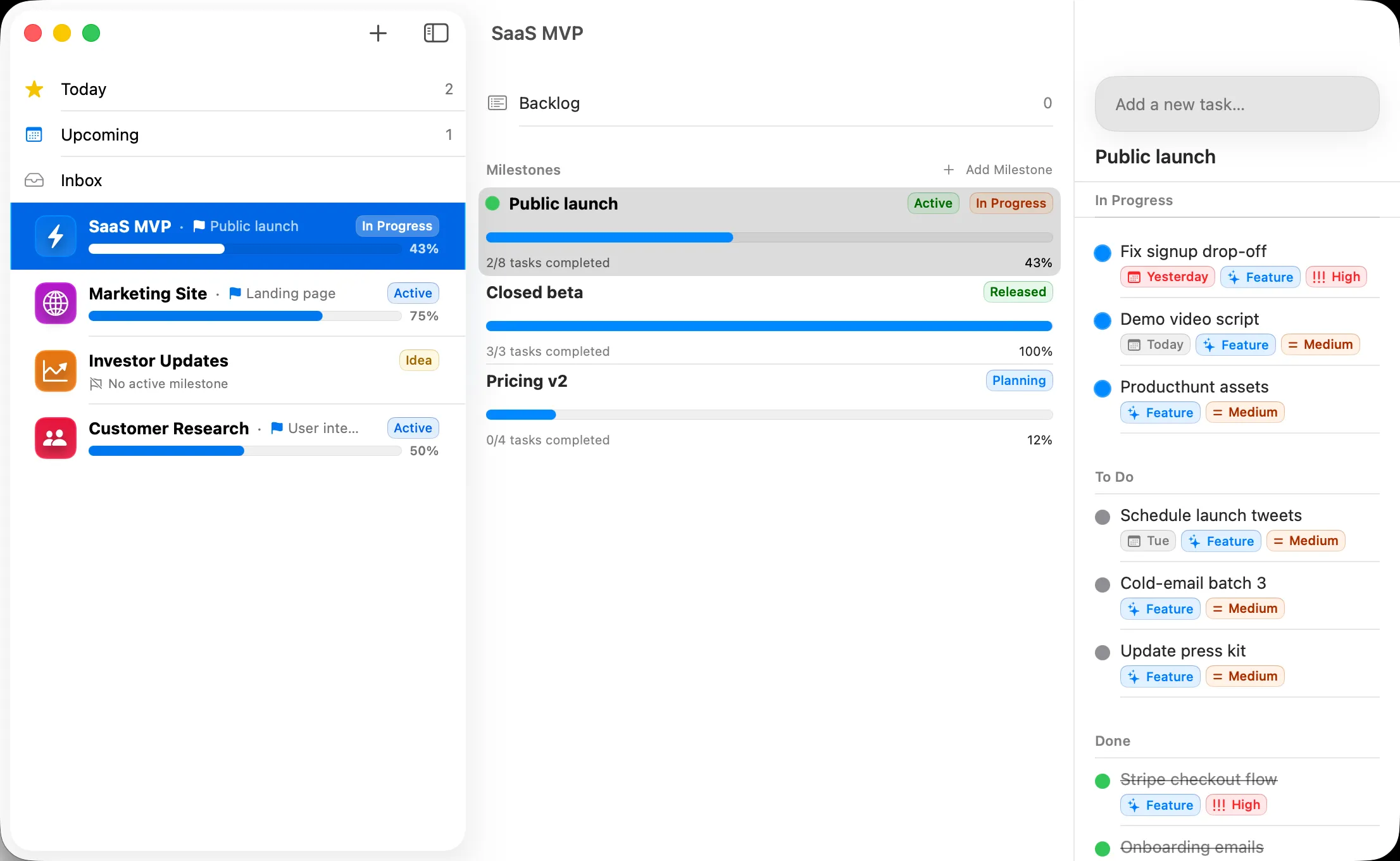
Milestones on the Mac: the sidebar with each project’s progress, a project’s milestones with their progress bars, and the tasks of the active milestone grouped into In Progress, To Do and Done.

The problem

Why most project apps feel wrong on a Mac

What people tend to run into before they find a Mac project app they keep.

A web page in a Mac costume

Many project tools on the Mac are their web app in a window. The menu bar is nearly empty, standard shortcuts don’t do what you expect, and nothing works until you’re signed in and the page has loaded. Most people end up keeping a browser tab open anyway, since it’s the same app.

Built for a team you don’t have

Team tools assume assignees, seats, permissions and a weekly status meeting. Working alone, you pay per seat for a workspace of one and click past fields nobody will ever read, and the project you care about gets buried under the setup it took to start it.

To-do lists that can’t show a project’s shape

A to-do app is great until a project has phases. A launch, a thesis or a client job turns into one long list where nothing says which phase is late or how far along you are, so you start keeping a second plan in a note or a spreadsheet next to it.

Gantt charts for a weekend project

The heavyweight Mac planners, such as OmniPlan and Merlin Project, are built for dependencies, resources and critical paths. That suits a construction schedule and is far too much for shipping an app or writing a book: you spend the evening drawing bars instead of doing the work.

Features

What makes Milestones a Mac app

The Mac app, feature by feature. Most of the keyboard and window work arrived with Milestones 2.0.

Native SwiftUI, not a port

Milestones on the Mac is a SwiftUI app with a real menu bar: File, Edit, View, Go, Task and Project menus, a Settings window laid out like System Settings, and a Text Size setting that scales the whole app. It runs on macOS 15 or later and uses Liquid Glass on macOS 26.

Keyboard first

Every command can carry a shortcut, and you can change any of them in Settings. ⌘K jumps to any project, milestone or list, the arrow keys move between the sidebar, the milestones and the tasks, Return edits the selected task, and ⌘T opens a new task from anywhere in the app.

Quick Entry from any app

Turn on Quick Entry and a global shortcut opens a small window for a new task while you’re in Xcode, Mail or a browser, without switching apps. Type the date in plain words, like “tomorrow at 5pm” or “every Monday”, add #tags and !1 to !3 for priority, and it’s filed.

Pick several, act once

⌘-click and ⇧-click pick tasks, projects or milestones the way Finder picks files. Change their status, date, priority or tags together, move them somewhere else, or drag a milestone onto another project in the sidebar to move it there with all of its tasks.

Milestones that show progress

Each project is split into milestones with their own due dates, tasks and progress bar, and the sidebar shows how far along every project is. Tasks are to do, in progress or done, and Pro adds a Kanban board for any project and for Today, Upcoming and Inbox.

Your AI agent can use it (Pro)

Pro turns on a local MCP server on the Mac, so Claude and other AI agents can list your projects, add milestones and tasks, and summarize your day. It listens only on your own Mac and asks for a token, so nothing leaves the machine through it.

Same projects on every Apple device

Your projects sync through your own iCloud to iPhone, iPad and Apple Watch, with no Milestones account to create. One App Store purchase covers Mac, iPhone and iPad, Setapp includes Milestones in its membership, and the Mac remembers its window size between launches.

Print, PDF and widgets

Print the task list of a milestone or a project’s backlog, or save it as a clean multi-page PDF to send to a client. With Pro, Milestones widgets can sit on your Mac desktop and in Notification Center, next to the ones on your iPhone.

Other options

Other project apps on the Mac, and who they suit

Milestones isn’t the right Mac app for everyone. If one of these describes your work better, start there.

OmniPlan
Gantt charts, dependencies and resources for scheduled projects
OmniFocus 4
Deep GTD task management with reviews and defer dates
Things 3
A polished personal to-do list for planning your day
Trello
Shared boards for small teams
Notion
Docs, wikis and databases in one workspace
Linear
Issue tracking for software teams

Not for everyone

Who Milestones isn’t for

  • Teams that need shared projects, assignees or comments: every project belongs to one person.
  • Gantt charts, dependencies or resource planning: OmniPlan or Merlin Project are built for that.
  • Anyone who also works on Windows, Android or in a browser: Milestones runs only on Apple devices.

Milestones on other devices: iPad

FAQ

Frequently asked questions

Is there a free project management app for Mac?

Milestones is free for two projects on the Mac, with no time limit, and archived projects don’t count toward that. Pro unlocks unlimited projects, repeating tasks, Kanban boards and widgets for $5.99 a month, $29.99 a year or $79.99 once, and covers iPhone and iPad too.

Is Milestones a native Mac app?

Yes. It’s written in SwiftUI for macOS, not Mac Catalyst or Electron, and needs macOS 15 or later. It has a full menu bar, keyboard shortcuts you can change, Quick Entry from any app and a Settings window laid out like System Settings.

Does it sync between Mac, iPhone and iPad?

Yes, through your own iCloud, with no Milestones account. Turn on iCloud sync and your projects, milestones and tasks appear on every device signed in to the same Apple Account, including the Apple Watch app.

Can my team use Milestones on their Macs?

Not together. Milestones has no shared projects, assignees or comments, and workspaces are personal. It’s built for people who run their own projects. Teams on Macs usually do better with Trello, Linear or Notion.

Does Milestones make Gantt charts?

No. Milestones shows progress for each milestone and project, with due dates, but no timeline bars, dependencies or resource levelling. For Gantt charts on the Mac, OmniPlan and Merlin Project are built for exactly that.

Where do I get the Mac app?

From the Mac App Store, where one purchase covers Mac, iPhone and iPad, or through Setapp, which includes Milestones in its membership. The same free plan applies on the Mac as on iPhone and iPad.

Plan your next project on the Mac

Free for two projects, on Mac, iPhone and iPad. Split one real project into milestones and see how it feels.

Download on the App Store

Free for two projects